Let's learn LLM streaming from first principles
May 5, 2026 • 10 min read
Go Agent SDK series - Part 3
Prerequisites: Part one of this series (structs, messages, and history) and part two (tool calling). This post builds on both and focuses on the piece that makes agents feel alive, streaming.
Code: the SDK I am building through this series lives here - github.com/parthshr370/Go-Agent-sdk
Table of contents
This is part three of a multi-blog series on building a Go Agent SDK from scratch. Part one covered the backbone, the structs that map to the API schema, message builders that shape each turn, and how history is maintained as a growing []llm.Message slice. Part two dived into tool calling, the most complex piece of the whole system, from registration to execution and result flow. This part picks up where that left off, tackling the piece that makes agents feel alive, streaming.
The goal of this blog is to walk you through streaming from first principles while I also implement streaming in my own agent SDK in Golang. This should help anyone who wants to learn streaming by doing. I will walk through the streaming layer from the SSE/HTTP layer to the agent layer. By the end you should be able to understand and shape streaming as a whole, while also learning its internals inside an agent SDK (like LangChain or pydantic-ai).
The waiting problem
The general idea of an agent SDK is:
- Send a request to an LLM
- Wait for it to respond
- Execute tool calls if any
- Compile and return the final response
Everything is built around this waiting mechanism where you wait for the entire answer to arrive at once.
Every time you send a message, the agent goes silent without any feedback. Then after a few seconds, the entire response drops on you at once. For short answers this is fine. For longer ones, or for tool calls where the agent is thinking through multiple steps, you are just staring at a blank screen wondering if the program hung.
Streaming solves both. The user side of giving feedback instantly, and the technical bottleneck where nothing is visible until the whole response is ready. Instead of waiting for the LLM to finish its entire thought before showing you anything, you get tokens as they are generated. Same answer, but you see it build up in real time.
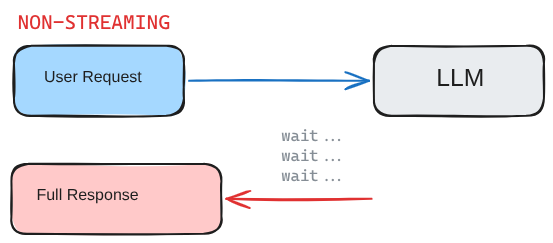
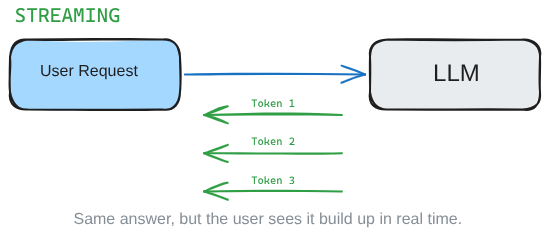
Let's contrast and compare.
This is what a normal response JSON looks like in a generic LLM API shape. A complete answer, but the first part of the answer arrives at the same time as the last part of the answer.
{
  "id": "resp_1234567890",
  "object": "response",
  "status": "completed",
  "model": "gpt-4.1-mini",
  "output": [
    {
      "type": "message",
      "role": "assistant",
      "content": [
        {
          "type": "output_text",
          "text": "AI, or artificial intelligence, is technology that lets computers perform tasks that usually require human thinking."
        }
      ]
    }
  ]
}
While streaming sends response items in deltas (we can call them chunks for simplicity). This example is also a generic skeleton. The exact field names change by provider, but the idea stays the same: small pieces arrive one by one.
[
  {
    "type": "response.created",
    "response": {
      "id": "resp_1234567890",
      "status": "in_progress",
      "model": "gpt-4.1-mini"
    }
  },
  {
    "type": "response.output_text.delta",
    "delta": "AI, "
  },
  {
    "type": "response.output_text.delta",
    "delta": "or artificial intelligence, "
  },
  {
    "type": "response.output_text.delta",
    "delta": "is technology that lets computers perform tasks "
  },
  {
    "type": "response.output_text.delta",
    "delta": "that usually require human thinking."
  },
  {
    "type": "response.completed",
    "response": {
      "id": "resp_1234567890",
      "status": "completed"
    }
  }
]
They arrive one by one in these complex JSONs and now it is our duty to handle these data formats and present them nicely to the users.
Before I implemented streaming, the only way to get a response back was through Run(). All the requests, tool calls, and messages were assembled and pushed through it.
Side note: Run() is the conductor that assembles messages, history, and tool calling together to form one coherent response loop. It sends a request, checks if the response is text or a tool call, executes tools if needed, and loops until the LLM gives a final text answer. We covered it in part two.
This works for normal responses. But Run() was built around one complete response. If we simply swapped the provider call to streaming, it would essentially fail the moment it saw a burst of streaming tokens, because text and tool arguments now arrive as fragments instead of complete JSON.
So as fate has it, I had to dive into the primitives of the HTTP world, aka SSE.
SSE and the open connection
Non-streaming requests go like, send request, read full body response, close.
Streaming responses are a bit like open taps. Keep the connection open, read the answers line by line as the server pushes Server-Sent Events, close when you receive a string that signals the stream closed.
The idea of SSE is there, but how would my Go SDK handle these open requests and then realize when to close the connection (and even trickier is to handle tool calls which might have incomplete JSONs)?
SSE internally is pretty simple. The server sends lines prefixed with data:, each line is a JSON payload. Blank lines separate events. Lines starting with : are comments (keepalive pings). The stream ends when the server sends data: [DONE] or just closes the connection.
On the wire it looks something like this:
: keepalive

data: {"id":"chatcmpl-abc123","choices":[{"delta":{"content":"Hello"}}]}

data: {"id":"chatcmpl-abc123","choices":[{"delta":{"content":" world"}}]}

data: [DONE]
Each data: line is a JSON payload the server pushes to us as it generates. Our job is to read these lines, parse the JSON inside them, and turn them into something our SDK can work with. But our SDK speaks in terms of Message, ToolCall, ChatResponse, not raw SSE lines. There is a gap between what the wire gives us and what our code needs. So before we start writing any code, here are the problems we need to solve:
- How do you represent a single streaming event in Go
- How do you parse provider-specific JSON into a common format
- How do you read from an open SSE connection line by line
- How do you stitch fragments back into a complete message
- How do tool calls work when their arguments arrive as fragments
Let's map out all the major blocks we need to build on.
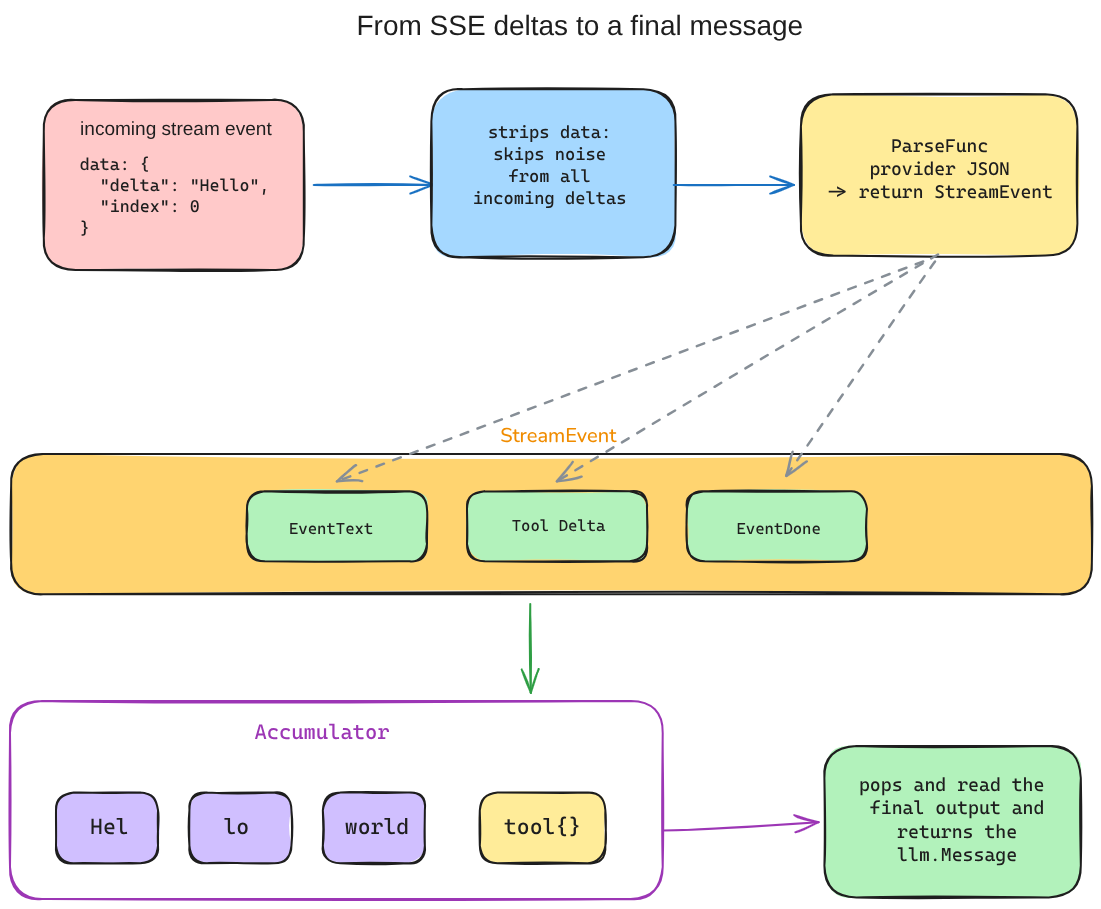
The path is simple once you see it laid out. Streaming data comes in, we strip out the important details, move those pieces into a buffer (the Accumulator), and then pop out one final message that the rest of the SDK can understand.
Laying down the data structs
First we need to account for the elephant in the room, that is the format in which data comes in. Since Go has structs we expect that the JSON comes in, converts to struct-based output, and then converts to something the SDK can understand (like I did in the previous blogs).
Side note: if you want a cleaner understanding of how marshalling works in Go and how JSON maps to structs, you can take a look at this blog. The same idea carries forward here, the only difference is we are dealing with fragments instead of complete responses.
We are going to take OpenAI's API as the baseline since it's the standard for most providers and we need to make minor tweaks on top of it to get full compatibility. Conceptually, OpenAI presents streaming data like this:
{
  "type": "response.output_text.delta",
  "sequence_number": 3,
  "item_id": "msg_1234567890",
  "output_index": 0,
  "content_index": 0,
  "delta": "artificial intelligence "
}
In the actual SDK, the OpenAI-compatible chat completions parser reads from choices[0].delta.content for text and choices[0].delta.tool_calls for tool calls. The example above is just the first-principles shape: event type, index, and delta. Now to think how it would translate to Go structs, it's as simple as:
type StreamEvent struct {
    Type EventType
    // Set when Type == EventText
    Text string
    // Set when Type == EventToolCallStart
    ToolCallID   string
    ToolCallName string
    // Set when Type == EventToolCallStart or EventToolCallDelta or EventToolCallDone
    ToolCallIndex int
    // Set when Type == EventToolCallDelta
    ToolCallArgs string
    // Set when Type == EventDone
    FinishReason string
}
This is the baseline struct, along with the event types that tell us what kind of event just arrived:
const (
    EventText EventType = iota
    EventToolCallStart
    EventToolCallDelta
    EventToolCallDone
    EventDone
    EventError
)
Now here is something that might look odd at first glance. StreamEvent has 6 fields but on any given event, only one or two of them actually have values. When a text delta arrives, the event looks like StreamEvent{Type: EventText, Text: "Hello"} and everything else is empty. When a tool call starts, ToolCallID and ToolCallName have values but Text and FinishReason are empty.
This is a design choice. We could have built separate structs for each event type, but that would mean separate types for text events, tool call events, done events, and so on. The code that consumes these events would then need type switches everywhere. One struct with a Type field is simpler and sufficient for our needs. You check Type first, then read the fields that are relevant to that type.
The EventType constants use iota, which is Go's way of auto-incrementing integer constants. EventText is 0, EventToolCallStart is 1, EventToolCallDelta is 2, and so on. The actual numbers don't matter, what matters is that each type has a unique value we can switch on.
Parsing the flowing data
Now we have a shape for a single stream event, but raw provider JSON still does not naturally arrive in that shape. OpenAI has one format, Anthropic has another, Gemini has another. So before the rest of the SDK can use these events, we need one small translator in the middle. That translator is ParseFunc.
ParseFunc is the adapter boundary. OpenAI, Anthropic, and Gemini all send different stream JSON, but after ParseFunc, the rest of the SDK only sees StreamEvent.
The delta comes in and goes through ParseFunc as:
type ParseFunc func(data string) (StreamEvent, error)Our information comes in these deltas (chunks) that are nested JSON objects that tell us a lot of information. In most cases we only need to parse some strings and values that we need, the rest will mostly be empty. Our job is to take that and return meaningful data from it.
Some data to look for:
- The actual text delta
- Hints that tell us the state of the stream at that particular moment (can be tool calls, end of stream, or something else entirely)
To do this we need a pipe and then a filter that reads from the end of the pipe.
Reading from the stream
So now we know what a parsed event should look like. But we still need something that actually sits on the open HTTP connection and keeps pulling data out line by line. This is the part that turns the open tap into something Go code can consume one event at a time.
We define two things, StreamReader (a struct) and Recv() (the receiver function).
type StreamReader struct {
    body    io.ReadCloser
    scanner *bufio.Scanner
    parse   ParseFunc
    done    bool
}bodyis the open HTTP connection, the tap that stays open while the server pushes eventsscannerreads lines one at a time from that connectionparseis the provider-specificParseFuncfrom the previous section that translates the JSON inside each linedonetracks whether we've seen the end signal so we don't read from a closed stream
Once this struct exists, the next job is simple: give me the next useful event from the stream.
func (r *StreamReader) Recv() (StreamEvent, error)
We use this function to fetch the data out, check for multiple strings inside the delta (chunk). For this case we just care about data: and its contents inside. Strip the prefix, check for the [DONE] state if any, otherwise hand the payload to ParseFunc.
StreamReader does not know what the JSON looks like, it only knows the SSE envelope. It strips the envelope, extracts the payload, and delegates. That is the separation of concerns here. StreamReader handles the wire format, ParseFunc handles the provider JSON.
bufio.Scanner reads one line at a time, so there is no buffering problem. You pull one event, process it, pull the next. The TCP connection handles backpressure on its own.
If no error happens, Recv() returns the StreamEvent as is. If there is an error, we close the stream and return it.
Accumulating the water
At this point the data is cleaner, but it is still not cohesive. We can read one event, then another event, then another event, but the user does not want scattered fragments. The user wants the complete answer. So we need something that acts as a stitching thread, pulling all the pieces together into a complete response.
Recv() gives us filtered data, but still in fragments. The Accumulator is the thing that holds those fragments long enough to turn them into a complete message.
For this we define a struct to hold the new stitched version:
type Accumulator struct {
    text      strings.Builder
    toolCalls map[int]*toolCallBuilder
}
strings.Builder for text, straightforward. Every text fragment that comes in gets appended to the builder. map[int]*toolCallBuilder for tool calls, this one needs a bit more explaining.
Tool calls are trickier than text because the LLM can start multiple tool calls in parallel. Each fragment carries an index that tells you which call it belongs to. So we key by that index. A toolCallBuilder holds the ID, the name, and a strings.Builder for the arguments:
type toolCallBuilder struct {
    id   string
    name string
    args strings.Builder
}
Why a map and not a slice? Because the LLM might use indices 0 and 2 but not 1. A map handles sparse indices cleanly, a slice would need nil checks or gap filling.
With the struct defined, we start spinning the small functions that help us wire it all together.
func (a *Accumulator) Add(event StreamEvent)
Add() is where the stitching happens. It takes a StreamEvent and switches on the Type:
- Text events append to the text builder (straightforward string concatenation)
- ToolCallStart events create a new builder in the map, keyed by index
- ToolCallDelta events append argument fragments (partial JSON strings) to the matching builder
One thing worth noting: Add() for EventToolCallStart also checks if ToolCallArgs is non-empty. That handles Gemini's case where args arrive complete in one shot instead of as fragments. The Accumulator does not care how the provider chose to deliver it, it just checks what is populated on each event.
Then we have our output functions:
Text()returns the complete accumulated textHasToolCalls()tells us if any tool calls were accumulatedToolCalls()returns them as the sameToolCalltype used byChatResponseMessage()builds a completeMessagefrom the accumulated data (the samellm.Messagetype that non-streaming produces)
One observation from all this. acc.Message() (the message formed after accumulating all the delta strings) produces the same llm.Message type that non-streaming produces. History does not care which path produced the message. A Message from streaming looks identical to a Message from Run(). This means the rest of the SDK, including history, tool execution, and conversation flow, does not need any special handling for streaming. The Accumulator is the bridge that makes streaming and non-streaming end in the same shape.
Side note: Each provider's ParseFunc handles its own JSON format, but the output is always the same StreamEvent, so the Accumulator never needs to know which provider it is dealing with.
OpenAI sends choices[0].delta.content for text and fragmented tool call arguments. Anthropic uses typed SSE events (content_block_start, content_block_delta, message_delta) and tool args arrive as partial_json fragments. Gemini uses a different streaming endpoint (streamGenerateContent?alt=sse), has no [DONE] sentinel (stream ends by EOF), and sends complete tool call arguments in one shot instead of fragments.
None of this matters to the Accumulator. It just checks what is populated on each event and stitches accordingly.
RunStream() - The streaming agent loop
Before streaming, the only way to get a response back was through Run() (the conductor that assembles messages, history, and tool calling into one coherent response loop). RunStream() from the outside is basically the same interface, same return type.
But instead of waiting for a full response from CreateChat() (non-streaming), it takes its data from StreamReader.Recv() (the stream receiver), and what feeds it is the Accumulator collecting events as they arrive.
First, a note on how the provider plugs into this. Not every provider supports streaming, so we have a separate interface for it:
type StreamProvider interface {
    CreateChatStream(ctx context.Context, req ChatRequest) (*StreamReader, error)
}
RunStream() type-asserts the provider to StreamProvider. If the provider does not implement it, it returns an error right there. Only providers that opt in to streaming get to use this path.
RunStream() runs two nested loops, and each has a distinct job:
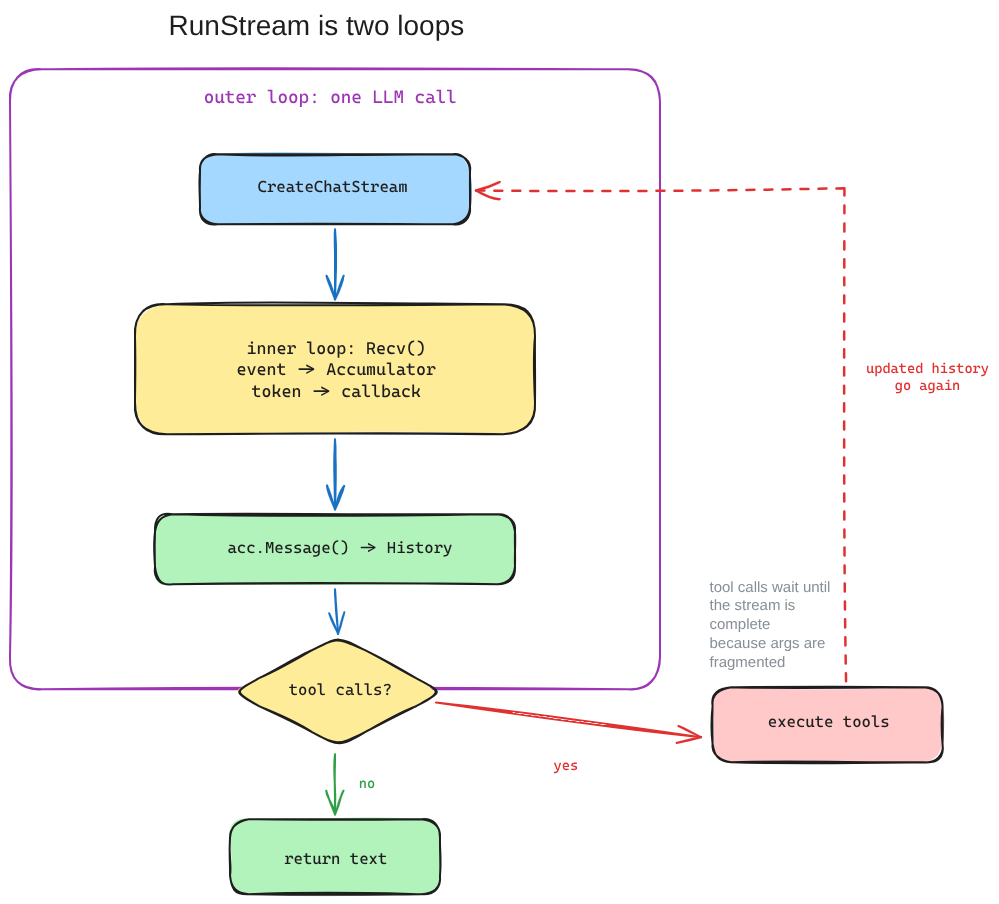
RunStream() has an outer loop for LLM calls and an inner loop for reading stream events until the response is complete.
// outer loop: one iteration per LLM call
for {
    // 1. Create the stream
    stream := sp.CreateChatStream(ctx, req)
    var acc llm.Accumulator

    // 2. Inner loop: read events one at a time
    for {
        event, err := stream.Recv()
        if err == io.EOF { break }
        acc.Add(event)
        // fire callback on text tokens
    }

    // 3. Stream done, accumulated message goes to history
    a.History = append(a.History, acc.Message())

    // 4. Check for tool calls
    if acc.HasToolCalls() {
        // execute tools, continue outer loop
        continue
    }

    // 5. No tool calls, return text
    return acc.Text()
}- Create the stream: same request format as
Run(), but instead of getting aChatResponse(the full response object) back, we get aStreamReaderholding an open connection. - Inner loop reads events one at a time: each
Recv()blocks until the next SSE chunk arrives, we feed it into the Accumulator viaAdd(), and if the event is a text token, we fire theOnStreamTokencallback immediately. That callback is what makes streaming visible to the caller (tokens appear in real time instead of the whole response dropping at once). - Stream done, message goes to history: when the inner loop ends (
Recv()returnedio.EOF), the Accumulator has the complete response.acc.Message()(the accumulated message) goes into history, samellm.Messagetype as non-streaming. - Tool call check: if the Accumulator picked up tool calls during streaming, we execute them (same as
Run()), append tool results to history, and continue the outer loop. The LLM will see the tool results in the next iteration and respond accordingly.
Note: Tool call execution cannot happen while the stream is still flowing, because the arguments may still be incomplete. Their arguments arrive as fragmented JSON strings across multiple deltas (chunks). The Accumulator stitches them together, but until the stream ends, the arguments are not complete enough to execute. That is why tool execution only happens after the inner loop finishes, not during it.
The exit: no tool calls means the LLM just responded with text, so we return it.
There is one more thing worth calling out. The key difference from Run() is that RunStream() uses iteration instead of recursion. Run() recurses because each call is a complete request-response cycle, and it calls itself after tool execution. RunStream() iterates because we are already managing state with the Accumulator across the inner loop, so the outer loop is just "go again with updated history." The continue in the tool call branch does what the recursive run() call does in the non-streaming path, but without adding another frame to the call stack.
Bookend
So we started with the waiting problem, built the data structs to hold streaming events, the ParseFunc that keeps StreamReader provider-agnostic, the StreamReader that reads from the open connection line by line, and the Accumulator that stitches fragments back into a complete Message. RunStream() plugged all of it into the same agent loop with two nested loops instead of recursion.
The key insight is that acc.Message() produces the same llm.Message as non-streaming. The Accumulator is the bridge that makes both paths end in the same shape. Everything downstream stays the same.
What comes next is making the SDK return structured Go types instead of raw strings. Think Agent[MovieInfo] instead of Agent[string]. That is structured output, and it is where we go next.
Further reading
- Go Agent SDK repo - the full codebase behind this series
- Go Agent SDK - Part 1 - structs, messages, and history
- Go Agent SDK - Part 2 - tool registration, schema generation, execution, and result flow
- JSON, Marshals and Go - useful if you want a cleaner mental model for marshalling, unmarshalling, and structs
- MDN Server-Sent Events - the browser/web primitive behind the streaming shape
- WHATWG Server-Sent Events spec - the actual HTML standard for SSE behavior